Streamlabs Desktop has everything you need to stream and create a memorable brand.
Streamlabs Desktop comes built-in with everything you need to stream to the top platforms. Optimized for the best video and audio quality—capture your webcam, games, desktop, music and microphone in one place. Create custom scenes for getting started, BRB, stream ending, and more.

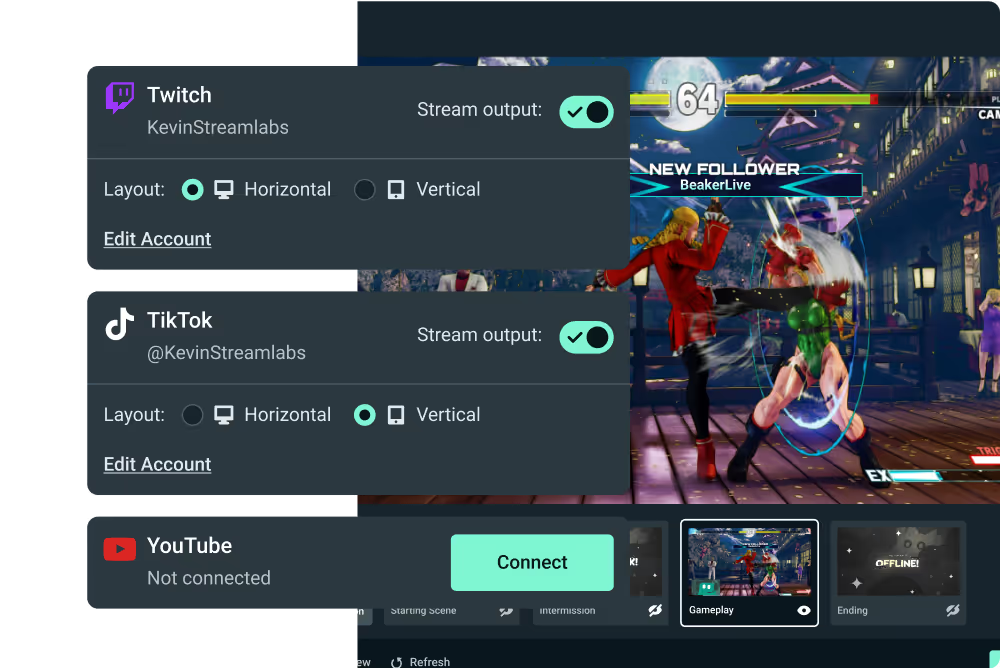
Stream to multiple derstinations in vertical and horizontal format simultaneously. Set and customize resolutions, scenes, and sources for bith layouts. Enjoy streaming to mobile-friendly platforms like YouTube, TikTok, and more. Go live to one of each format for free or more with Ultra.
Live streaming with another person is easy. SImply share a link to add a guest or additional camera. They hear and see you and your chat while you stream. Invite a friend to chat or game or show off your pet, keyboard, or art. The possibilities are endless!
Refer to this guide on how to go live from Xbox using Streamlabs.
No, with Streamlabs Console, a PC or capture card is not required to create a high-quality live stream. Streamlabs Console allows Xbox streamers to add alerts, overlays, and widgets to their streams in the same way pros do while maintaining an intuitive and simple-to-use solution.
With Streamlabs Console, you can stream to Twitch, with the option to additionally stream to YouTube, TikTok, and Kick.
Yes! Streamlabs Console now supports Dual Output so you can design your vertical and horizontal outputs for different platforms.
Yes, similar to Streamlabs Desktop, Console supports multiple scenes. Streamlabs Console comes with default graphics and images for Starting Soon, Be Right Back, and Stream Ending Soon scenes. You can also upload custom images on your own for different scenes of your choice.